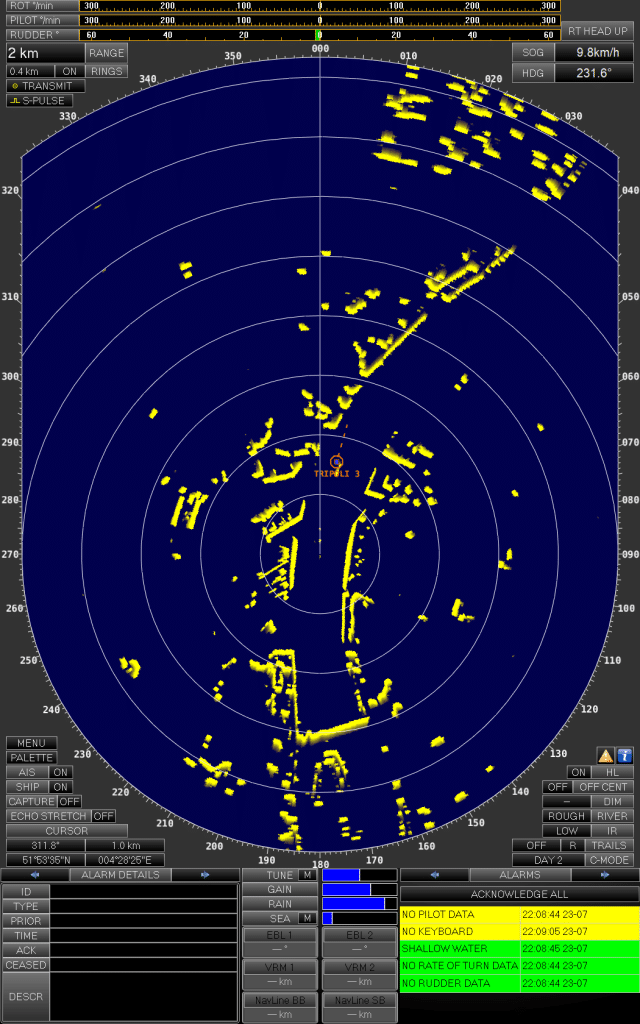
A radar simulator built into the NAUTIS bridge
A radar simulator lets officers practise radar navigation, plotting and ARPA use in conditions they cannot safely create at sea: dense traffic in restricted visibility, a target that changes course at close range, or a radar that starts giving misleading information. In NAUTIS, radar is not a separate training box. It runs on the same simulated bridge as the outside view, ECDIS, conning panel and communication, so trainees learn to read the radar picture while they are also steering, keeping a lookout and working as a bridge team.
What trainees practise on a radar simulator
The IMO model course for radar at operational level (1.07, Radar Navigation, Radar Plotting and use of ARPA) describes the core of what a radar simulator has to support:
- understanding how shipborne radar and ARPA work and how the system is configured
- the factors that affect radar performance, and the limits and accuracy of the information on screen
- using the operational controls correctly to get an optimal display
- obtaining, displaying and analysing radar information to maintain safe navigation
At management level, model course 1.08 adds radar and ARPA use for command decision-making, bridge teamwork and search and rescue. On a NAUTIS bridge those skills are trained inside a realistic scenario rather than on an isolated radar screen, which is where most of the difficulty lies for new officers.
Radar simulator options in NAUTIS
Radar is part of every NAUTIS family, from desktop to full mission bridge. The table below shows where it fits and which radar-related model courses are listed for each family.
| NAUTIS setup | Radar training focus | Radar-related model courses listed |
|---|
| Desktop simulators (Class C) | Radar and ARPA basics alongside ship handling, for classroom groups | 1.07 |
| Console simulators (Class B) | Radar navigation with a wider outside view and communication training | 1.07 |
| Full mission bridge (Class A) | Radar use in bridge resource management and bridge team exercises | 1.07, 1.08 |
| Portable Simulator | Radar, ECDIS and azimuth control in one mobile setup | 1.07 |
| Tug simulators | Radar/ARPA during azimuth tug handling | 1.07 |
| Inland simulators | Inland radar training and examination, ready for CESNI certification | ES-QIN radar simulator requirements |
For inland navigation, the ES-QIN standard sets the requirements for radar simulators used in boatmaster training and examination. STC Next is one of the training institutes that strengthened its inland radar training with NAUTIS.
Standards and certification
The STCW Convention (Regulation I/12 and Section A-I/12) sets performance standards for simulators used in training and assessment, including radar and ARPA simulation. NAUTIS itself is a DNV certified simulator, assessed against DNV-ST-0033. That certification covers the simulator. Approval of a specific radar course delivered on it rests with the national administration or training authority that approves that course.
Part of a complete bridge
Radar training works best when it happens in context. Combine it with bridge simulation for full watchkeeping exercises, add GMDSS so communication runs in the same scenario, or see how everything fits together on the NAUTIS simulator page.
Frequently asked questions
What is a radar simulator used for in maritime training?
A radar simulator is used to train radar navigation, radar plotting and ARPA use without the risks of a real vessel. Instructors create traffic, reduced visibility and equipment failures on demand, so officers practise interpreting the radar picture and making collision avoidance decisions in situations that are rare, costly or unsafe to reproduce at sea.
Which IMO model courses can be taught on the NAUTIS radar simulator?
Radar/ARPA model course 1.07 is listed for the NAUTIS desktop, console, full mission bridge, portable and tug setups. The full mission bridge configurations also list model course 1.08 at management level. Which courses fit your programme depends on the configuration, so our team can map your curriculum against the available setups.
Is the NAUTIS radar simulator certified?
NAUTIS is a DNV certified simulator, assessed against DNV-ST-0033, and the inland configurations are ready for CESNI certification. That certification covers the simulator itself. Whether a specific radar course meets STCW or ES-QIN requirements is decided by the administration or authority that approves that course, so the simulator supports your approval process rather than replacing it.
Can radar training be combined with ECDIS and ship handling exercises?
Yes. In NAUTIS the radar, ECDIS, outside view and conning panel run in the same scenario, so a trainee plots targets while also steering and navigating. The instructor can add traffic, change visibility or trigger equipment failures during the exercise, and then replay the whole session in the debrief to show where decisions were made.
Want to see the NAUTIS radar simulator in action? Book a demo and see how radar and ARPA exercises run on a NAUTIS bridge.