

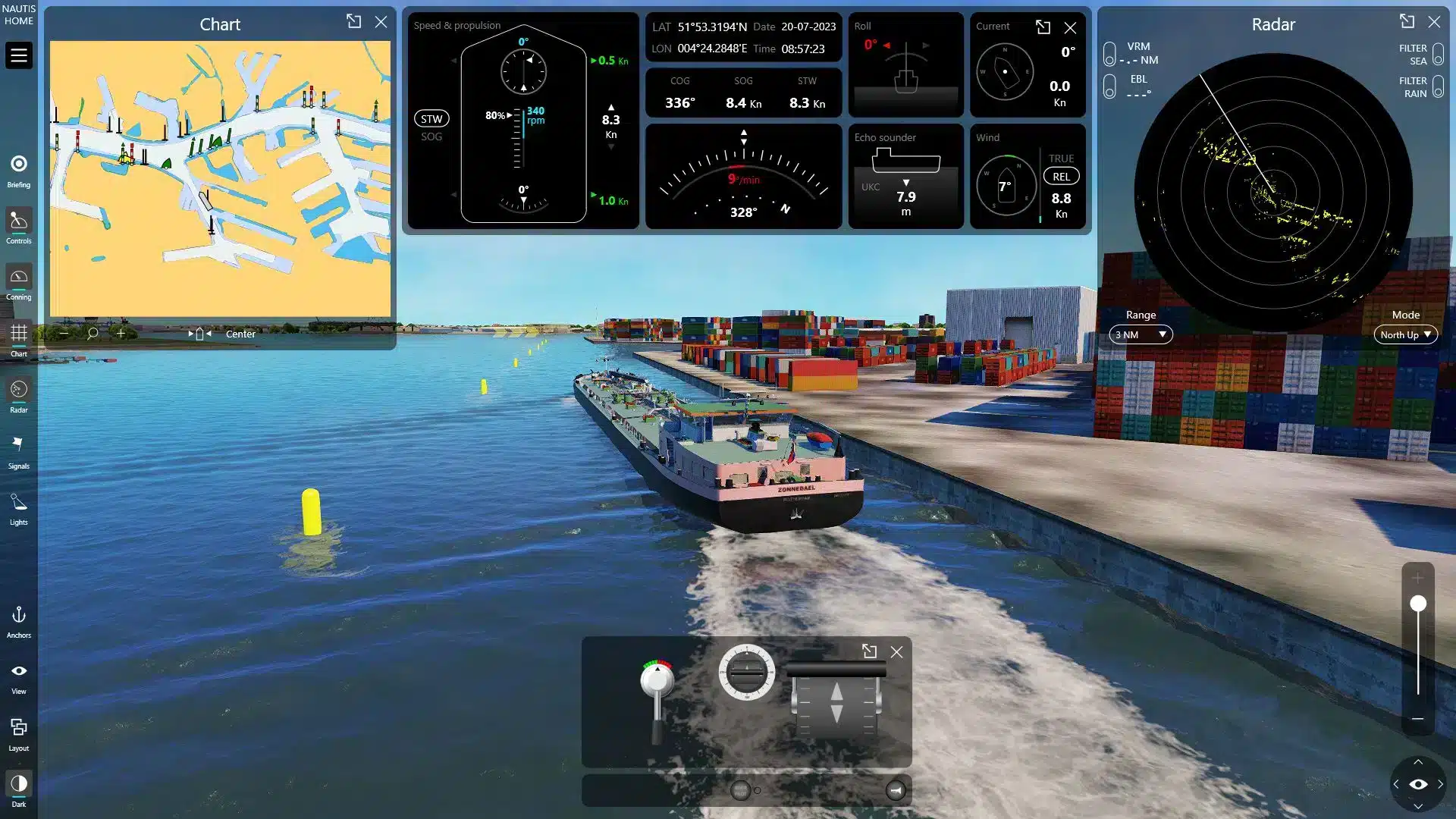
25/07/2025 – Looking for a ship simulator for PC that enables realistic, scenario-based maritime training at home or anywhere else? NAUTIS Home offers a professional-grade simulation experience, based on VSTEP’s proven NAUTIS software trusted by training centers and maritime institutes around the world. With advanced hydrodynamics, structured training modules, and progress tracking via the VSTEP Learning Experience Platform (LXP), NAUTIS Home allows you to practice navigation, manoeuvring, and other essential nautical skills, whether you’re training individually or as extra practice alongside your maritime education.
Why NAUTIS Home is a standout ship simulator for PC
NAUTIS Home is purpose-built for individual training, assessment, and skill development, whether you’re a student, maritime professional, or independent learner.
What sets it apart? First, it’s powered by the same software used in professional-grade NAUTIS simulators. That means realistic vessel handling and lifelike hydrodynamics in a virtual maritime world. Every turn, wave, and engine response feels accurate and authentic. You also get access to structured training scenarios that guide you through essential tasks like navigation, manoeuvring, and emergency procedures. With clearly defined objectives, each session helps you progress with purpose. NAUTIS Home is fully optimized for PC. Whether you prefer keyboard and mouse or use external USB controls, the experience remains smooth and responsive. Dual-screen support is also included, allowing you to manage radar, charts, conning, and vessel controls.
Core training features of NAUTIS Home
NAUTIS Home is built to deliver a realistic and flexible training experience, giving you the tools to grow your skills step by step. Whether you’re just getting started or already have experience at sea, its core features are designed to support meaningful progress. Here’s what you can expect:
- Multiple training modes: select between Training Mode and Free-Roam Mode. In Training Mode, follow structured exercises to build your skills. In Free-Roam, choose your own vessel, weather, and port to explore dynamic conditions, from a sunny day in Hong Kong to stormy waters near New York.
- Targeted nautical skill development: train essential skills like sharp turns, manoeuvring through narrow straits, operating in high-traffic areas, and performing docking procedures, all in realistic conditions.
- Global environments & diverse fleet: simulate operations in iconic ports like Antwerp, Rotterdam, New York, and Singapore. Vessels range from tugboats and inland cargo ships to cruise liners and coasters, each recreated in detail.
- Briefing and assessment: each scenario comes with a clear briefing, route overview, and set performance objectives to guide your training and track your progress.
This combination of structured learning and open exploration makes NAUTIS Home a powerful platform for anyone serious about developing maritime skills, whether for education, professional use, or personal passion.
Who is NAUTIS Home for?
NAUTIS Home is designed to be flexible, accessible, and effective for a wide range of users. Whether you’re exploring maritime simulation for the first time or using it as part of professional development, this platform meets you where you are. Here’s how different groups can benefit:
- Maritime enthusiasts can experience high-fidelity simulation using a realistic ship simulator for PC based on professional-grade software. With NAUTIS Home, they can explore different vessels and ports, engage in realistic manoeuvres, and enjoy a true-to-life maritime experience from the comfort of their own PC.
- Maritime students have the opportunity to practice navigation and manoeuvring skills alongside their formal education. NAUTIS Home offers a structured way to apply what they learn in class, making their training more interactive and practical through guided scenarios and performance tracking.
- Independent learners are able to train at their own pace, from anywhere, using structured scenarios and progress tracking. The flexibility of the platform allows them to focus on their development without the need for a classroom setting, while still following a clear and effective learning path.
- Professional seafarers can maintain and refresh their nautical competencies through realistic simulation. Whether brushing up on specific procedures or staying familiar with navigation tasks, NAUTIS Home supports continued proficiency even while off duty.
- Training institutions can extend their curriculum with scalable, PC-based simulation, ideal for blended learning. The platform integrates smoothly with existing programs and allows instructors to offer consistent, high-quality training experiences both in-person and remotely.
No matter your background or experience level, NAUTIS Home delivers realistic maritime training that adapts to your goals.
“Did you know? That research shows that interactive, scenario-based learning leads to better retention of concepts and procedures than traditional, lecture-based instruction.“
Getting started with NAUTIS Home
Getting started with NAUTIS Home is simple and takes just a few steps. Whether you’re new to maritime simulation or ready to continue your training journey, the platform is designed to be easy to access and user-friendly from the very beginning. Here’s how to begin:
- Create your learning profile: register via VSTEP LXP. This is your hub for courseware access, subscription management, and progress tracking.
- Activate your subscription: choose your preferred plan directly in the platform:
- 1 month – €5.95 (Early Access)
- 6 months – €29.75 (Early Access – Save 16.5%)
Regular pricing applies after limited launch period.
- Download and Install
Once activated, follow the step-by-step instructions in LXP to install NAUTIS Home on your PC.
Where a ship simulator download fits in
A ship simulator download is the practical starting point: you create an account in the learning environment, pick a subscription and install the software on your own PC. What you get afterwards depends on the software class you picked, so it helps to know the wider picture before you install anything.
- Read what running one at home looks like on our ship simulator page, including system requirements.
- See how home practice compares with academy training in PC ship simulator: train like a seafarer.
- Training a crew instead of yourself? Start at ships simulator and ship handling simulator.


